What Are HCM Scenarios
HCM scenarios are named collections of input assumptions that define how distributed energy resources (DER) and demand growth will be distributed across the network in future years.
Why Scenarios Matter
Scenarios enable "what-if" analysis by allowing network operators to compare different DER adoption trajectories, test various technology mixes, and assess network constraints under different growth patterns. Rather than planning for a single predicted future, operators can explore multiple plausible futures and design networks that perform well across various conditions.
Data Architecture
HCM scenarios follow a hierarchical data structure that flows from detailed behavioural patterns up to high-level scenario definitions:
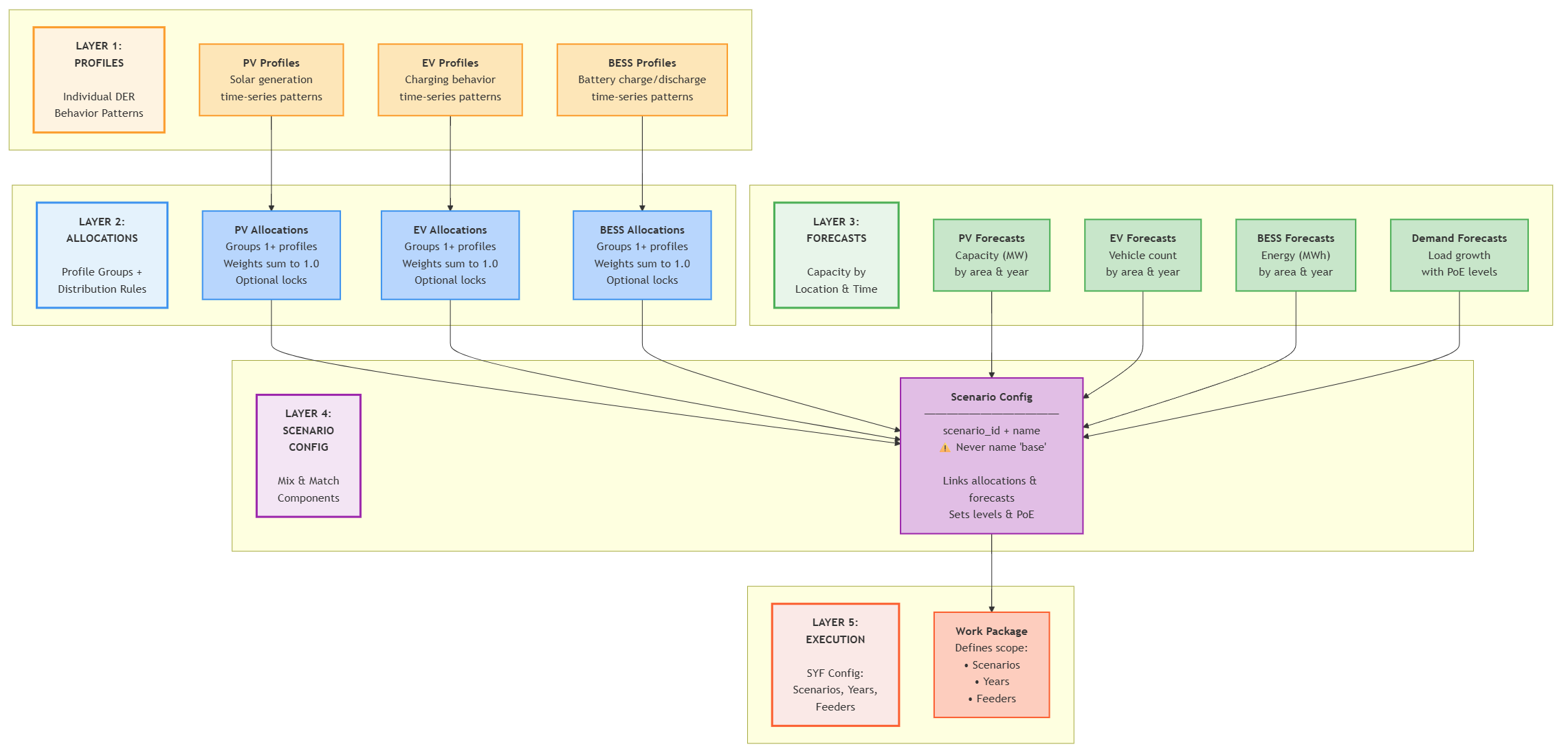
Profiles: Individual Behaviour Patterns
At the foundation are profiles - time-series data that capture how different DER technologies behave:
- PV Profiles define solar generation patterns with technical specifications like panel tilt, orientation, and inverter sizing
- EV Profiles capture charging patterns that vary by vehicle class, charger type, and usage patterns
- BESS Profiles model battery charge/discharge cycles with efficiency characteristics and control strategies
Each profile contains normalized power arrays (typically 17,520 intervals representing 30-minute data for a year) plus technical metadata about phases, capacity, and efficiency.
Allocations: Grouping with Rules
Allocations group multiple profiles for each DER type and define the rules for how they get distributed across the network:
- Probability weighting allows mixing different profile configurations (e.g., 60% of installations use 5 kW single-phase systems, 40% use 10 kW three-phase systems)
- Locking mechanisms control whether profiles can be used flexibly or must match specific years or feeders
- Probability weights are relative - they do not need to sum to 1.0, as only the proportions between them matter
Forecasts: Capacity by Location and Time
Forecasts specify how much DER capacity will be installed where and when:
- PV Forecasts define megawatts of solar capacity by network area and year
- EV Forecasts specify numbers of electric vehicles by class and location
- BESS Forecasts set energy storage targets in megawatt-hours
- Demand Forecasts project background load growth with uncertainty levels
Forecasts can be specified at different network hierarchy levels, from individual feeders up to entire regions.
Scenario Configuration: Mix and Match
Scenario configurations are where operators mix and match the building blocks above to create specific futures:
- Each scenario references specific allocation strategies for each DER type
- Scenarios can combine different forecast assumptions (high solar + low batteries, moderate EVs + high demand growth)
- Different scenarios can use different network aggregation levels and uncertainty assumptions
Profile Allocation Concepts
Profile allocation determines how behavioural patterns get distributed across network locations. Two key mechanisms control this distribution:
Probability Weighting enables realistic technology diversity. Instead of assuming all solar installations behave identically, allocations can specify that 60% follow one behavioural pattern while 40% follow another, representing different system sizes, orientations, or control strategies.
Locking Mechanisms control allocation flexibility:
- Year locking restricts profiles to specific time periods, useful for modelling technology evolution
- Feeder locking ensures location-specific characteristics are preserved, important for geographic differences
These mechanisms allow scenarios to balance computational efficiency with realistic representation of technology diversity across time and space.
How PV is allocated in a scenario
Step 1: Check if the target is already met
The amount of PV needed for the year and feeder is extracted from the input table pv_forecasts, either through pv_panel_capacity (MW, DC) (primary method - if both values are non-null this will be used) or inverter_capacity (MW, AC) (used only if pv_panel_capacity is null).
The total current PV capacity on the feeder is calculated by summing the ratings of all existing PV systems in the network model (in DC if using pv_panel_capacity and AC if using inverter_capacity).
The deficit is calculated as the difference between the forecast target and the current PV capacity on the feeder. If the deficit is zero or negative, no PV will be added and the process stops. No PV is ever removed, even if the forecast target is lower than current capacity.
Step 2: Build the initial candidate pool
The initial candidate pool consists only of consumers with no existing solar. If no candidates exist, a warning is logged and the process stops.
Step 3: Select and install
A consumer is selected at random from the candidate pool and assigned a PV system drawn from a weighted profile pool. The profile determines system size and phase configuration (single or three-phase). The proportion of three-phase installs can be controlled via the max_percent_multiphase parameter. The consumer is then removed from the pool and the process repeats until either the target is met or the pool is exhausted.
Step 4: Pool exhausted, target not met
Once all consumers without solar have been allocated, the candidate pool is rebuilt to include consumers with existing PV systems where the DC capacity is below pvUpgradeThreshold (default 5 kW). This captures pre-existing real-world installs that are small enough to be realistic upgrade candidates.
- If new candidates are found, return to Step 3.
- If the pool is still empty, proceed to Step 5.
Step 5: Raise the upgrade threshold
The upgrade threshold is increased by 1 kW and the candidate pool is rebuilt.
- If candidates are found, return to Step 3.
- If the threshold reaches 10 kW, a warning is logged but allocation continues.
- If the threshold reaches 30 kW, the scenario is rejected as misconfigured. Note that this could cause issues in feeders where large PV systems are common and the forecast target is high.
- Otherwise, repeat Step 5.
Step 6: Upgrading an existing system
Where a selected consumer already has a PV system, a new install is not created. Instead, the inverter capacity and DC/AC ratio are recalculated to represent the combined old and new system as a single upgraded install.
How BESS is allocated in a scenario
Step 1: Check if the target is already met
The allocation target is extracted from bess_forecasts using capacity_mw (MW, AC), converted to VA internally. Note that capacity_mwh exists in the table but is not currently used. Current BESS capacity is calculated by summing the AC inverter ratings of all existing battery systems on the feeder.
If the deficit is zero or negative, the process stops. No BESS is ever removed, even if the forecast target is lower than current capacity.
Step 2: Build the initial candidate pool
Initial candidates must have no existing battery system and a PV system with an inverter rating greater than 5 kVA. This reflects the real-world norm of BESS being paired with a reasonably sized solar installation. If no candidates exist, a warning is logged and the process stops.
Step 3: Select and install
A consumer is selected at random and assigned a BESS from a weighted profile pool, which determines system size and phase configuration. Three-phase installs can be capped via max_percent_multiphase in bess_forecasts (0.0–100.0). The consumer is removed from the pool and the process repeats until the target is met or the pool is exhausted.
Step 4: Pool exhausted, target not met
The pool is rebuilt with looser criteria, dropping the PV co-location requirement. The rebuilt pool includes:
-
Consumers with no existing battery system, regardless of PV.
-
Consumers with an existing BESS below
bessUpgradeThreshold(default 5 kW). -
If new candidates are found, return to Step 3.
-
If still empty, proceed to Step 5.
Step 5: Raise the upgrade threshold
The threshold is raised by 1 kW and the pool is rebuilt.
- If candidates are found, return to Step 3.
- If the threshold reaches 10 kW, a warning is logged but allocation continues.
- If the threshold reaches 30 kW, the scenario is rejected as misconfigured. Note that this could cause issues in feeders where large BESS systems are common and the forecast target is high.
- Otherwise, repeat Step 5.
Step 6: Upgrading an existing system
Where a selected consumer already has a BESS, no new unit is created. Instead, both inverter capacity and storage capacity are updated to represent the combined old and new system as a single upgraded install.
How EV is allocated in a scenario
Step 1: Check if the target is already met
The allocation target is extracted from ev_forecasts using number_of_ev. The forecast column accepts decimals, but HCM currently reads the value as an integer, so any fractional part is truncated (e.g. 5.7 becomes 5). Current EV charger count is calculated by summing all existing EV charging units on the feeder.
If the deficit is zero or negative, the process stops. No EV chargers are ever removed, even if the forecast target is lower than the current count.
Step 2: Build the candidate pool
All consumers on the feeder are candidates for EV charger installation. If no consumers exist, a warning is logged and the process stops.
Unlike PV and BESS, there is no upgrade path for EV - existing charger data is not currently available at the level of detail required for upgrade modelling, so all installations are treated as new.
Step 3: Select and install
A consumer is selected at random and assigned an EV charger from a weighted profile pool, which determines charger size and phase configuration. Three-phase installs can be capped via max_percent_multiphase in ev_forecasts (0.0–100.0). Each charger always receives its own new connection, and the same consumer can receive multiple chargers. The process repeats until the target count is met.
Step 4: Safety limit
There is no pool exhaustion in the same sense as PV and BESS: consumers are not removed from the pool after selection. Instead, a warning is raised once the number of allocated chargers exceeds the total number of consumers on the feeder, and the scenario is rejected if allocations reach 1000 times the consumer count without meeting the target - a threshold high enough that it will only be triggered by a severely misconfigured forecast.
How demand scaling is applied
Unlike DER allocation, which targets an exact forecast quantity, demand scaling applies a growth ratio derived from the forecast to each base load in the model. The model does not re-anchor loads to match the forecast's absolute magnitude - it only applies the relative change between the base year and the target year.
The base year for demand forecasting purposes is determined from the final timestep of the load data time period selected. For example, if you use:
start_time  =   2025-01-01T00:00
end_time    =   2026-01-01T00:00
Then the base demand year will be 2026. If you want it to be using 2025, adjust slightly to ensure the load time ends in CY2025
Calculating the scaling factor
For each feeder, HCM fetches the forecast total demand for both the base year and the target year, then computes:
scaling_factor = forecast_target_year_peak / forecast_base_year_peak
Both the base year and target year peaks come from the forecast input database, not from measured load data. This is intentional: using forecast values for both sides of the ratio ensures consistency, since the growth trend is derived entirely from the forecaster's assumptions rather than mixing actuals with projections.
The load database is still required, but only to determine the timestamp of the feeder's annual peak. This timestamp is used to select the correct seasonal forecast (winter or non-winter), since many DNSPs maintain separate demand forecasts for summer and winter peaks. Real and reactive load are handled independently, each using their own seasonal peak timestamp.
Example
Consider a feeder with three customers, each with a smart meter. In the base year (2026), their measured loads are:
| Customer | Base load |
|---|---|
| A | 80 kW |
| B | 120 kW |
| C | 150 kW |
The total base load in the model is 350 kW. However, the demand forecast puts the feeder at 500 kW in 2026, growing to 600 kW in 2027, a scaling factor of 1.2.
In the 2027 simulation, each customer's load is scaled by 1.2:
| Customer | Base load | Scaled load (2027) |
|---|---|---|
| A | 80 kW | 96 kW |
| B | 120 kW | 144 kW |
| C | 150 kW | 180 kW |
The total modelled load becomes 420 kW - not the 600 kW the forecast projects. The 150 kW gap between the model's base load (350 kW) and the forecast base year (500 kW) is preserved and carried forward. HCM has no mechanism to close this gap; it only applies the growth ratio.
What this means in practice
If a feeder's base loads are understated relative to the forecast starting point - for example because some customers lack smart meters and are represented by default profiles - the scaled loads will remain understated by the same proportion throughout the forecast period. This does not affect DER allocation, which still targets the full forecast quantity. As a result, the apparent impact of DER on the feeder may look larger than it would in reality, since the DER load is being added on top of an already-understated baseline.
Scenario Execution
Scenarios run independently within work packages.
For step-by-step guidance on configuring scenarios, see the How to Configure HCM Scenarios guide.
Never name a custom scenario base. The system automatically includes a hardcoded base scenario representing current network conditions without additional DER uptake or demand changes. Naming your own scenario base will cause conflicts with this system baseline.
The base scenario can be called in the SYF config during work package configuration without needing to define it in the scenario_configuration table.